

- Full-stack observability - Complete tracing and analytics for every request
- 250+ LLMs - Switch between OpenAI, Anthropic, Google, AWS Bedrock, and 250+ models
- Enterprise reliability - Fallbacks, load balancing, automatic retries, and circuit breakers
- Smart caching - Reduce costs up to 80% with semantic and simple caching
- Production guardrails - 50+ built-in checks for safety and quality
- Prompt management - Version, test, and deploy prompts from Portkey’s studio
Migrated from
@portkey-ai/vercel-provider?We’ve updated our integration to use Vercel’s standard OpenAI provider for better compatibility with the rapidly evolving Vercel AI SDK. This new approach gives you access to all Vercel features while maintaining full Portkey functionality.Quick Start
1. Installation
2. Get Your Portkey API Key
Sign up for Portkey and copy your API key from the dashboard. You’ll use this to authenticate with Portkey’s gateway.3. Configure the OpenAI Provider
Point the OpenAI provider to Portkey’s gateway:4. Use Any Model
Use models from your AI Providers with the@provider-slug/model-name format:
Core Features
Text Generation
Generate text with any model usinggenerateText:
Use
openai() for OpenAI’s completion models and openai.chat() for chat completion models from any provider (Anthropic, Google, AWS Bedrock, etc.).Streaming Text
Stream responses in real-time withstreamText:
Structured Data Generation
Generate validated, structured outputs withgenerateObject:
Tool Calling
Enable your AI to use tools and functions:Image Generation
Generate images with DALL-E or other image models:AI Agents
Build autonomous agents with tool usage and reasoning:Custom Parameters
Fine-tune model behavior with temperature, tokens, and retries:Portkey Headers
Enhance your requests with Portkey’s powerful headers:Trace ID
Track and debug requests with custom trace IDs:Metadata
Add custom metadata for filtering and analytics:Configs via Headers
Apply Portkey configs using the config ID or inline JSON:Learn more about Portkey Headers
Using AI Providers & Model Catalog
Portkey’s Model Catalog lets you manage all your AI providers and models from a centralized dashboard with governance, budget limits, and access controls.Setting Up Providers
- Go to the Model Catalog in Portkey dashboard
- Click “Add Provider” and choose your AI service (OpenAI, Anthropic, etc.)
- Add your API credentials
- Give your provider a unique slug (e.g.,
@openai-prod)
Using Provider Models
Reference models using the@provider-slug/model-name format:
Model Catalog
Centralized management for all your AI providers and models
Budget & Rate Limits
Set spending controls and rate limits for your providers
Portkey Configs
Portkey Configs enable advanced routing, reliability, and governance for your AI requests. You can apply configs in two ways:Method 1: Inline in Model Name
Reference a saved prompt or config directly in the model name:Method 2: Via Headers
Pass config ID or inline config via headers:Enterprise Features
Observability & Analytics
Get complete visibility into your AI operations with automatic request logging, performance metrics, and cost tracking: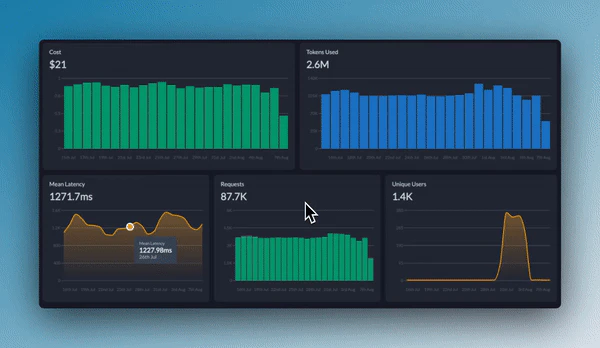
- Request/response payloads - Full tracing of inputs and outputs
- Performance metrics - Latency, tokens, and throughput
- Cost tracking - Real-time spend across all providers
- Error monitoring - Automatic error detection and alerts
Observability
Explore Portkey’s full observability suite
AI Gateway Features
Portkey’s AI Gateway makes your AI applications production-ready with enterprise reliability:Fallbacks
Automatic failover between models and providers
Load Balancing
Distribute traffic across multiple providers
Automatic Retries
Smart retry logic for transient failures
Caching
Reduce costs by 80% with semantic caching
Request Timeouts
Handle unresponsive requests gracefully
Conditional Routing
Route requests based on custom logic
AI Gateway
View all gateway features and capabilities
Guardrails
Enforce safety, quality, and compliance with real-time guardrails:- PII detection and redaction
- Toxic content filtering
- Prompt injection protection
- Custom regex and keyword filters
- Sensitive data detection
Guardrails
Set up real-time safety and compliance checks
Prompt Management
Manage, version, and deploy prompts from Portkey’s Prompt Studio:Prompt Playground
Test prompts across 250+ models side-by-side
Prompt Versioning
Version control for all your prompts
Prompt Library
Centralized prompt repository
Prompt API
Deploy prompts via API endpoints
Migration Guide
From @portkey-ai/vercel-provider
If you’re migrating from the old Portkey Vercel provider package:
Before:
- Use
@ai-sdk/openaiinstead of@portkey-ai/vercel-provider - Set
baseURLto Portkey’s gateway - Reference models using
@provider-slug/model-nameformat - Pass configs via headers or inline in model names
- ✅ Better compatibility with Vercel AI SDK updates
- ✅ Access to all Vercel AI SDK features immediately
- ✅ Simpler setup with standard OpenAI provider
- ✅ More flexible config management
Support & Resources
API Reference
Complete API documentation
Discord Community
Get help from the community
Contact Support
Reach out to our team
GitHub
Contribute to Portkey Gateway