

You can find the full code here
The Problem with Generic Evaluations
Many teams start with off-the-shelf metrics like “helpfulness” rated 1-5. As Hamel Hussain notes in his evaluation guide: “Binary evaluations force clearer thinking and more consistent labeling.” Instead of vague scales, effective evaluations should:- Use binary metrics: Pass/fail decisions that force clarity
- Be domain-specific: Tied directly to your application’s success criteria
- Be verifiable: Validated against expert-labeled data
What We’ll Build
In this cookbook, we’ll take a ground-up approach to building custom evaluations for your AI application using Portkey. We’ll work through a practical example: an AI agent that analyzes Amazon product reviews. Our agent needs to:- Classify sentiment (positive/negative/neutral)
- Return results in a specific JSON format
Our Evaluation Framework
Using real Amazon review data, we’ll build evaluations that check:- Format compliance: Does the output match our required JSON schema
{"sentiment": "positive"}?
Prerequisites
Technical Requirements
- Python 3.7+
- Basic API knowledge
- Command line familiarity
Accounts Needed
- Portkey account
- OpenAI/Anthropic API key
- 10 minutes to configure
Part 1: Building Your Evaluation Framework
Design Your Evaluation Prompt
Portkey’s Prompt Library is a centralized platform for managing, versioning, and deploying prompts across your AI applications. It provides:- Version Control: Track changes and rollback to previous versions
-
Variable Substitution: Use mustache-style templates (
{{variable}}) for dynamic content - Model Configuration: Set provider, model, and parameters in one place
- Team Collaboration: Share and manage prompts across your organization
1
Create New Prompt
Navigate to Prompts → Create Prompt in your Portkey dashboard
2
Configure Basic Settings
- Name:
sentiment-analysis-evaluator - Provider: OpenAI (or your preferred provider)
- Model: gpt-4o-mini
- Temperature: 0 (for consistency)
3
Add System Instructions
4
Create the User Prompt
Add this template with mustache variables:
5
Save and Copy ID
Save the prompt and copy the Prompt ID (e.g.,
prm_abc123)Create the JSON Schema Validator
1
Navigate to Guardrails
Go to Guardrails → Create Guardrail
2
Configure Validator
- Name:
sentiment-json-validator - Type: JSON Schema Validator
- Position: After (validates model output)
3
Add Schema
4
This Guardrail will act as a check after the response and validate if the model repose is a valid JSON schema as we need.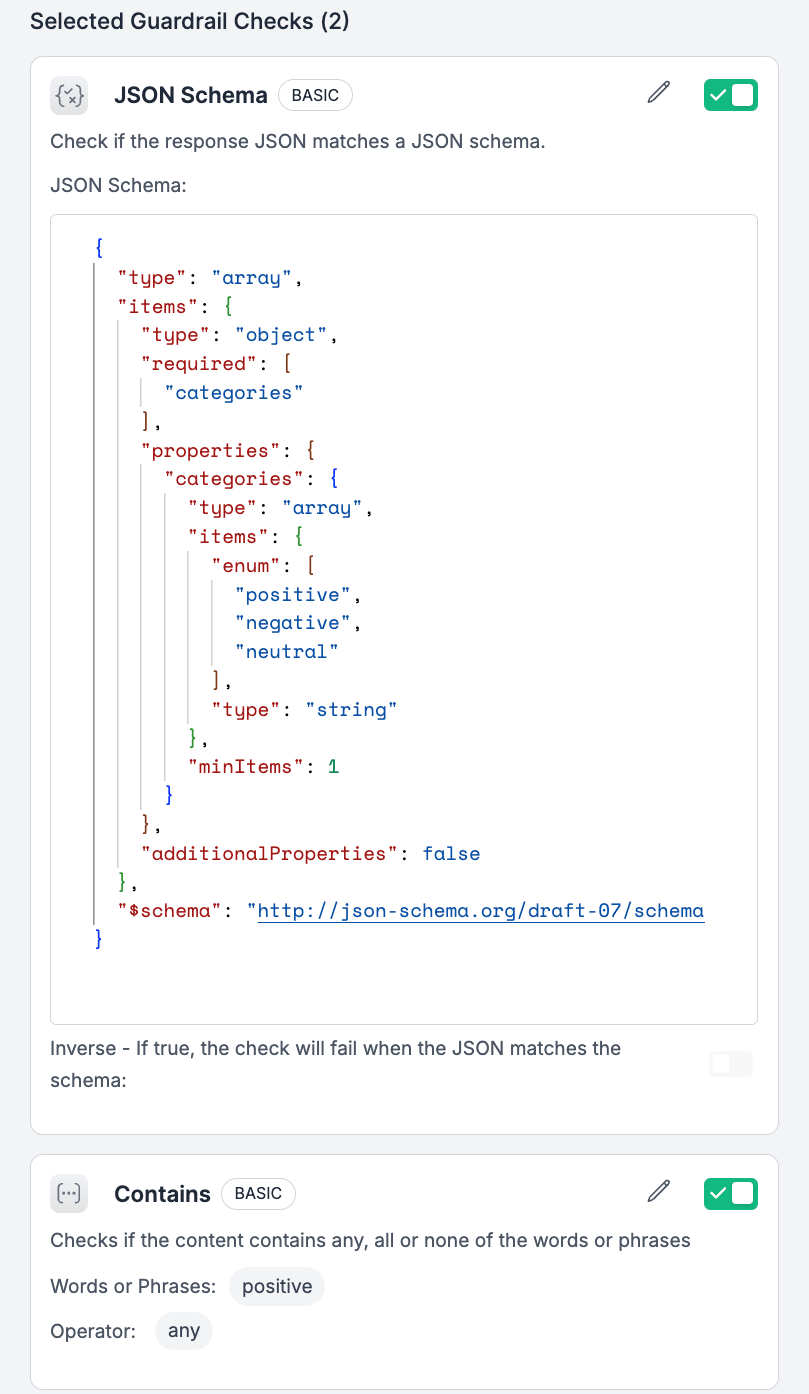
Combine with a Config
Configs orchestrate how requests route with Portkey. You can define a config as a JSON inside Portkey app and access it in your Portkey Client usingconfig_id.
1
Create Config
Navigate to Configs → Create Config
- Name:
sentiment-eval-config
2
Save Configuration
Copy the Config ID (e.g.,
cfg_xyz789)What You've Built So Far
What You've Built So Far
- ✅ A prompt that clearly defines the sentiment analysis task
- ✅ Output validation that ensures consistent JSON formatting
- ✅ A config that ties everything together
Part 2: Running Batch Evaluations
Now that we have our prompt template and guardrails configured, let’s run evaluations at scale using Portkey’s batch processing capabilities. Batch processing allows you to evaluate hundreds or thousands of examples efficiently and cost-effectively.Why Batch Processing for Evaluations?
Portkey’s batching engine lets you run thousands of LLM calls across any provider—whether or not they support native batching. It handles everything for you: queuing, retries, timeouts, and async execution. You don’t need to manage infrastructure; Portkey ensures high-throughput, reliable inference at scale. Plus, every call in the batch is fully observable, with token usage, cost, and latency available for monitoring and optimization.Setting Up the Evaluation Pipeline
Let’s build a complete pipeline that:- Fetches real Amazon reviews from Hugging Face
- Formats them for batch processing
- Runs them through our configured prompt
- Collects results with automatic scoring
Step 1: Fetch Amazon Reviews
We’ll use the Hugging Face datasets API to fetch real Amazon product reviews:You can increase the
length parameter to evaluate more reviews. For production evaluations, you might process hundreds or thousands of reviews.Step 2: Create JSONL File
Portkey’s batch API expects a JSONL (JSON Lines) file where each line is a separate request:Step 3: Upload File to Portkey
Step 4: Create Batch Job
Now we create the batch job, specifying our config ID to apply guardrails:Step 5: Monitor Batch Status
Step 6: Retrieve and Process Results
Understanding the Results
The script outputs a CSV with your evaluation results. Here’s what matters:- status_code 200: Request passed JSON schema validation ✅
- status_code 246: Request failed JSON schema validation ❌
What to Do Next
1
Fix Schema Failures
If you see 246 status codes, check:
- Is your prompt output format clear?
- Did you include enough examples?
- Is the JSON structure in your prompt exactly right?
2
Scale Up
Change
length: 10 to length: 100 or length: 1000 to test more reviews3
Add More Guardrails
Create guardrails for:
- Checking if negative reviews mention refunds
- Validating positive reviews aren’t too short
- Flagging reviews that need human review
Conclusion
You now have:- A working evaluation pipeline
- Automatic JSON validation
- Batch processing for scale
- Clear pass/fail metrics
Resources
- Portkey Docs - API reference
- Discord - Get help
- Support: support@portkey.ai
Complete Script
Here’s the complete script you can save and run:View Complete Batch Evaluation Script
View Complete Batch Evaluation Script